Sub-Forms and Composition
The real power of the UI Builder comes from composition: forms that contain controls that themselves host forms. This lets you build large, complex UIs from small, well-defined pieces — the same way a Kontakt library builder thinks in groups and zones rather than individual samples.
Controls That Host Sub-Forms
Section titled “Controls That Host Sub-Forms”Two control types can embed a form or switch between forms:
| Type | Description |
|---|---|
subForm | Renders one named form inside its bounds |
portal | Shows one of several forms based on a parameter value; supports animated transitions |
The full property lists are in the Reference.
The subForm Control
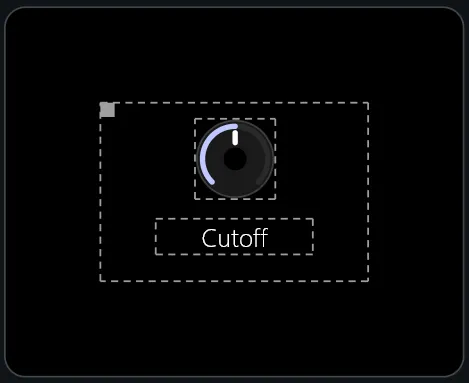
Section titled “The subForm Control”The most direct composition tool. Point it at another form by name via
props.form, and it renders that form inside its bounds.
Passing Data via macroParameters
Section titled “Passing Data via macroParameters”A subForm control can supply a props.macroParameters block — macro values
that apply only inside that sub-form instance. This is how you build reusable
components: define the form once, instantiate it multiple times with different
macros.
Example: a reusable “parameter knob” sub-form
Define param_knob.frm with a knob, label, and value display that all reference
$param-id and $label-text:
# param_knob.frmwidth: 60height: 80
controls:  knob:    type: knob    anchors: { left: 5, right: 5, top: 0, height: 50 }    props:      parameterUid: $param-id
  value_display:    type: parameterDisplay    anchors: { left: 0, right: 0, top: 52, height: 14 }    props:      parameterUid: $param-id
  label:    type: text    anchors: { left: 0, right: 0, bottom: 0, height: 14 }    props:      text: $label-text      alignment: bottomCenter
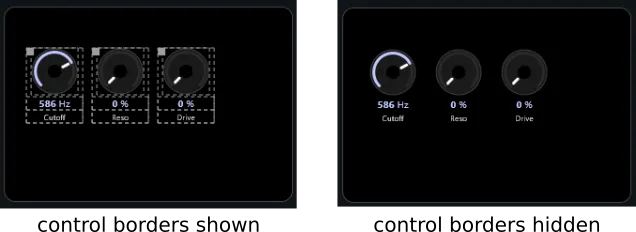
Then instantiate it three times on your main form:
# main.frm — controls sectioncontrols:  knob_cutoff:    type: subForm    pos: { x: 20, y: 40, w: 60, h: 80 }    props:      form: param_knob      macroParameters:        $param-id: "uuid-filter-cutoff"        $label-text: Cutoff
  knob_reso:    type: subForm    pos: { x: 90, y: 40, w: 60, h: 80 }    props:      form: param_knob      macroParameters:        $param-id: "uuid-filter-resonance"        $label-text: Reso
  knob_drive:    type: subForm    pos: { x: 160, y: 40, w: 60, h: 80 }    props:      form: param_knob      macroParameters:        $param-id: "uuid-filter-drive"        $label-text: Drive
Three fully wired knobs, one form definition, zero repetition.
Recursive Composition
Section titled “Recursive Composition”Sub-forms can themselves contain subForm controls pointing to further
sub-forms. There is no fixed depth limit. A typical production UI might look
like:
main.frm └─ header_bar (subForm) └─ tab_portal (portal) ├─ osc_tab.frm │ └─ param_knob × 4 (subForm) ├─ filter_tab.frm │ └─ param_knob × 3 (subForm) │ └─ filter_type.frm (subForm) └─ fx_tab.frm └─ reverb_panel.frm (subForm) └─ delay_panel.frm (subForm)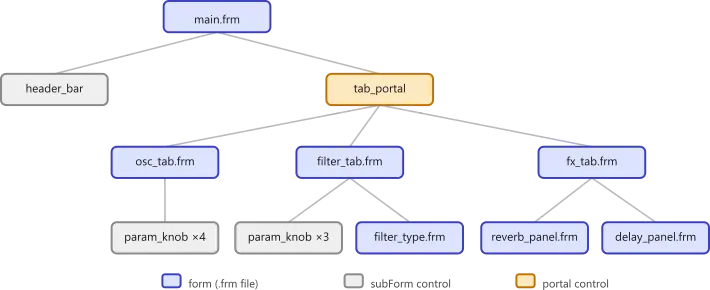
The portal Control
Section titled “The portal Control”portal is the switching layer — it holds a list of forms and shows one at a
time based on a parameter value. It replaces the need for separate tab-panel and
conditional-panel concepts.
content: type: portal anchors: { left: 0, right: 0, top: 32, bottom: 0 } props: parameterUid: tab-index transition: crossfade transitionTime: 300 forms: - form: osc_tab - form: filter_tab - form: env_tabWhen tab-index is 0, osc_tab is shown; when it is 1, filter_tab, and
so on. You typically bind the same parameter to a buttonSelector for the tab
header — the two stay in sync automatically.
Passing Macros per Form
Section titled “Passing Macros per Form”Each entry in the forms list can have its own macroParameters, just like a
subForm:
forms: - form: channel_strip macroParameters: $channel-id: ch1 - form: channel_strip macroParameters: $channel-id: ch2This lets you reuse the same form definition for each portal slot with different data passed in.
Transition Modes
Section titled “Transition Modes”transition | Description |
|---|---|
crossfade | Fades between forms (default) |
slide | Slides the outgoing form out |
transitionTime is in milliseconds; default is 500.
Design Principles
Section titled “Design Principles”- One concern per form. A
filter_panelform should know about filter parameters only. Don’t mix concerns. - Macros for variation, not duplication. If two forms differ only in the
parameter they’re wired to, that’s one form with two
subForminstantiations. - User-defined parameters for UI state. Tab index, selected mode, expanded/collapsed state — these are UI concerns. Create them as global parameters in Patch Settings.
- Deep nesting is fine. Three or four levels of sub-form is normal. More than six is a signal to refactor.