RT Scripting: Global Cutoff Rescaling (Pass 3)
This pass adds one small but important change to the script: subscribing to
the externalCutoff facade parameter — created in
Global Parameters Pass 2 — and converting it to
the engine’s internal cutoff range in real time.
Why a Facade Parameter
Section titled “Why a Facade Parameter”The engine’s SVF filter cutoff spans 20–6000 Hz. Exposing that range directly as a user-facing knob would make the control almost unplayable on a bass instrument — the useful range occupies only a tiny slice at the low end. Clamping or rescaling inside the UI is not sufficient because the DAW records and replays automation against the parameter it sees; if the UI maps 0–1 to 70–200 Hz, an automation sweep of 0–1 would still send the full 0–1 range to the engine the moment a preset is loaded without the UI open.
The solution is a facade parameter: externalCutoff (Generic Float,
0–1) is what the user and the DAW interact with. The RT script subscribes to
it and translates it to the internal cutoff frequency, keeping the translation
consistent regardless of whether the UI is visible.
Assign a Name to the Engine Cutoff Parameter
Section titled “Assign a Name to the Engine Cutoff Parameter”Rather than copying and pasting the Cutoff knob’s raw UID, this is a good
opportunity to use a named parameter. In the main.flr layer editor,
right-click the Cutoff knob on the SVF filter processor and choose
Assign name.
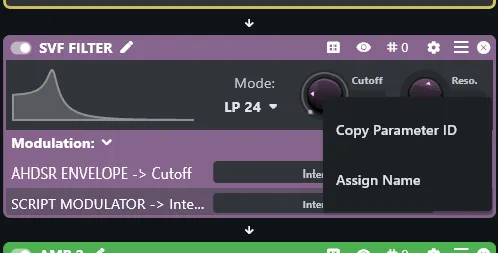
Enter filter/cutoff and confirm. The script can now reference this parameter
by name rather than by a UUID — keeping the code readable and self-documenting.
Update the Script
Section titled “Update the Script”1 — Add the parameter name variable
Section titled “1 — Add the parameter name variable”In the UID section at the top of step_sequencer.script, add:
local parameterIdInternalCutoff = "filter/cutoff"2 — Subscribe and convert
Section titled “2 — Subscribe and convert”Anywhere after the UID section, add the subscription and conversion function:
function setExternalCutoff(rescaled)  local minCutoff = 70  local maxCutoff = 200
  -- apply a quadratic curve to the linearised frequency range;  -- precise exponential response is not crucial here — x^2 is tuned by ear:  rescaled = rescaled * rescaled
  local value = rescaled * (maxCutoff - minCutoff) + minCutoff  sys_set_parameter_value(parameterIdInternalCutoff, value)end
setExternalCutoff(sys_subscribe_to_parameter("externalCutoff", setExternalCutoff))
How It Works
Section titled “How It Works”rescaled arrives in the 0–1 range (Generic Float). Squaring it before the
linear interpolation applies a gentle exponential curve: at 0.25 (the default)
the output is 0.0625 × 130 + 70 ≈ 78 Hz — a reasonable starting
position for a bass filter. At 1.0 the output reaches 200 Hz. The quadratic
shape means the knob feels more responsive in the lower range, where the
perceptible difference between frequencies is greatest.
The conversion runs in the RT script for two reasons. First, the RT script is always active, even when no UI is open, so the translation is never silently bypassed during automation playback or preset loading. More importantly, the RT script runs on the audio thread. When a DAW replays automation, parameter changes arrive on that same realtime thread — handing them off to UI Lua would mean crossing a thread boundary and losing sample-accurate synchronisation. By handling the conversion in the RT script, the engine cutoff updates in lockstep with the audio buffer, exactly as the DAW intended.
Outline
Section titled “Outline”- Global controls UI (filter knob wired to externalCutoff, delay, reverb, master volume)