Lua Scripting
Each form can have an optional Lua script. Scripts react to parameter changes and control events, and can modify control properties at runtime. Use scripting when parameter bindings alone are not expressive enough.
Script-Driven vs. Parameter-Bound Controls
Section titled “Script-Driven vs. Parameter-Bound Controls”Most interactive controls (knob, fader, toggle, buttonSelector) can work
in two modes:
- Parameter-bound — set
parameterUidinpropsand the control syncs automatically. Preferred when possible. - Script-driven — omit
parameterUid; set an initialvalueand attach a handler function via the appropriatepropsfield (e.g.onChange).
The handler value in props is a string matching the name of a top-level
function in the form’s Lua script:
# In the .frm YAMLmode_toggle: type: toggle pos: { x: 8, y: 8, w: 48, h: 24 } props: value: 0 onChange: on_mode_changed-- In the .frm Lua scriptfunction on_mode_changed(controlName, value) -- controlName: the control's ID; value: new toggle state (false or true) sys_modify_control("detail_panel", "", {visible = value})endEvery control callback receives the control’s ID as its first argument — always, including callbacks with no further payload. This is a strict convention. Its main benefit is that you can wire the same function to multiple controls and dispatch on the caller:
function on_any_toggle(controlName, value) sys_log(controlName .. " changed to " .. tostring(value)) -- react differently depending on which control firedendbutton controls use onPressed instead of onChange; the handler receives
only the control name (no value argument).
Attaching a Script
Section titled “Attaching a Script”In the form editor, click Edit Script. This opens the Lua editor for the
current form. Each .frm file has exactly one script, scoped to that form.
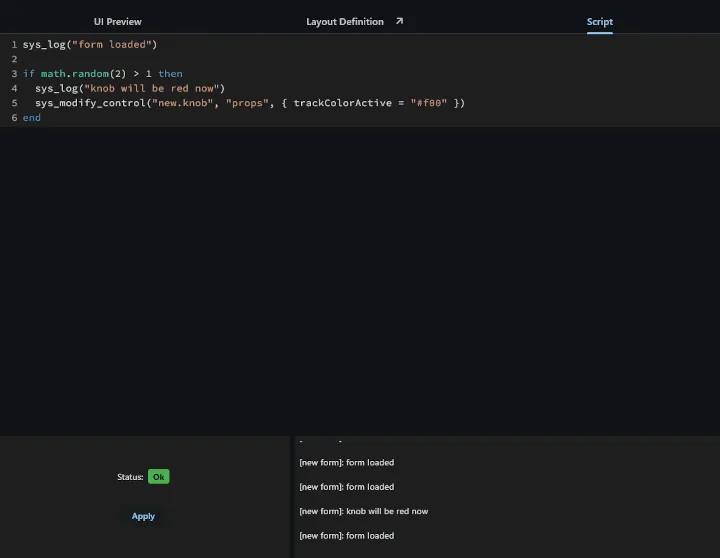
Top-level code in the script (outside any function) runs once when the form loads — use this for initialization: subscribing to parameters, setting initial control states, etc.
API Reference
Section titled “API Reference”sys_log(object)
Section titled “sys_log(object)”Writes a message to the script console in the editor. Accepts any value — tables are printed in a readable form.
sys_log("tab index changed")sys_log(value)sys_log({x = 10, y = 20})sys_form_macros
Section titled “sys_form_macros”A read-only table built into every form script that holds all macro values in
effect for the current form instance. This includes the built-in stylesheet
macros ($text-color, $knob-size, etc.) and any custom values passed via
macroParameters when the form is embedded as a subForm.
Keys are the full macro names including the $ prefix.
-- Read a custom macro passed by the parent formlocal paramId = sys_form_macros["$param-id"]
-- Read a built-in stylesheet macrolocal textColor = sys_form_macros["$text-color"]
The main use case is when a reusable sub-form needs to subscribe to whichever parameter the parent passed in — something that cannot be expressed in YAML alone:
-- Sub-form script: subscribes to the parameter macro the parent suppliedlocal uid = sys_form_macros["$param-id"]sys_subscribe_to_parameter(uid, function(value) sys_modify_control("indicator", "props", {value = value})end)sys_modify_control(control_name, domain, changes)
Section titled “sys_modify_control(control_name, domain, changes)”Changes one or more properties of a control at runtime.
| Argument | Type | Description |
|---|---|---|
control_name | string | The control’s ID (the key in the controls: map) |
domain | string | Top-level field to target: "pos", "anchors", "props", or "" for a root-level field such as visible |
changes | table | Key/value pairs of properties to update |
Not all properties can be changed at runtime. Bitmaps, for example, require a preload step at form initialization and cannot be swapped via script.
Examples:
-- Show or hide a controlsys_modify_control("detail_panel", "", {visible = false})sys_modify_control("detail_panel", "", {visible = true})
-- Move a control (absolute placement)sys_modify_control("my_knob", "pos", {x = 20, y = 100})
-- Change multiple props at oncesys_modify_control("my_label", "props", {text = "Active", color = "#C0C7FF"})
sys_set_parameter_value(parameter_id, value)
Section titled “sys_set_parameter_value(parameter_id, value)”Sets a parameter value. parameter_id accepts either the parameter’s UUID or,
if it has one, its human-readable name. Engine parameters never have a name —
use the UUID copied from the editor. User-defined global parameters have both;
the name is usually more readable.
sys_set_parameter_value("08afbf03-738b-48ad-a340-0c482f505683", 0.75)sys_set_parameter_value("tab-index", 1) -- global parameter, by namesys_subscribe_to_parameter(parameter_id, callback)
Section titled “sys_subscribe_to_parameter(parameter_id, callback)”Registers a callback that fires whenever the parameter changes, and returns the
parameter’s current value at the time of subscription. parameter_id accepts
either a UUID or, if the parameter has one, its name — same rule as
sys_set_parameter_value above.
Works particularly well with anonymous functions:
sys_subscribe_to_parameter("uuid-tab-index", function(value) sys_modify_control("panel_osc", "", {visible = value == 0}) sys_modify_control("panel_filter", "", {visible = value == 1}) sys_modify_control("panel_env", "", {visible = value == 2})end)Because the call returns the current value, “read once, then react to changes” is a single line — feed the return value straight back into the same handler function:
local function sync_visibility(value)  sys_modify_control("panel_osc",    "", {visible = value == 0})  sys_modify_control("panel_filter", "", {visible = value == 1})  sys_modify_control("panel_env",    "", {visible = value == 2})end
sync_visibility(sys_subscribe_to_parameter("uuid-tab-index", sync_visibility))
Only one subscription per parameter per form is active at a time. Calling
sys_subscribe_to_parameter again on the same parameter replaces the previous
callback.
sys_send_script_message(channel_name, data)
Section titled “sys_send_script_message(channel_name, data)”Sends a value to a named channel. Every script that has subscribed to that channel — whether a UI script or a realtime (RT) script — receives the value via its registered callback.
data can be any Lua value: number, bool, string, table, or nil.
Delivery is asynchronous and buffered when crossing the UI/RT thread boundary (UI → RT or RT → UI). Delivery is synchronous between two UI scripts on the same thread.
sys_send_script_message("sequencer", {command = "play"})sys_send_script_message("sequencer", {command = "stop"})sys_send_script_message("engine-reset", nil)sys_subscribe_to_script_messages(channel_name, callback)
Section titled “sys_subscribe_to_script_messages(channel_name, callback)”Registers a callback that fires whenever a message arrives on the named channel. The callback receives the sent value as its only argument.
sys_subscribe_to_script_messages("sequencer", function(msg) sys_log("received: " .. msg.command)end)Multiple scripts can subscribe to the same channel independently. Each receives every message sent to that channel.
sys_create_timer(milliseconds, callback)
Section titled “sys_create_timer(milliseconds, callback)”Installs a recurring timer that calls callback every milliseconds
milliseconds. The callback receives no arguments. Returns an opaque handle that
can be passed to sys_cancel_timer to stop the timer.
local handle = sys_create_timer(100, function() update_display()end)Timers continue firing for the lifetime of the form unless cancelled. Cancel any timer you no longer need to avoid unnecessary CPU wake-ups.
sys_cancel_timer(handle)
Section titled “sys_cancel_timer(handle)”Cancels a recurring timer installed with sys_create_timer. Passing an
already-cancelled handle is a no-op.
sys_cancel_timer(handle)sys_make_color_rgba(red, green, blue, alpha)
Section titled “sys_make_color_rgba(red, green, blue, alpha)”Creates an HTML color string from RGBA components. All four values are integers
in [0 .. 255]. alpha is optional and defaults to 255 (fully opaque). The
returned string can be used wherever a color prop is expected.
local red = sys_make_color_rgba(255, 0, 0) -- fully opaque redlocal faded = sys_make_color_rgba(0, 128, 255, 128) -- 50% transparent bluesys_modify_control("my_label", "props", {color = sys_make_color_rgba(200, 100, 50)})sys_make_color_hsl(hue, saturation, lightness, alpha)
Section titled “sys_make_color_hsl(hue, saturation, lightness, alpha)”Creates an HTML color string from HSL components. hue is in [0 .. 360],
saturation and lightness are in [0.0 .. 1.0], and alpha is an integer in
[0 .. 255]. alpha is optional and defaults to 255 (fully opaque).
local warm = sys_make_color_hsl(30, 0.8, 0.5) -- warm orange, opaquelocal cool = sys_make_color_hsl(200, 0.6, 0.4, 180) -- semi-transparent bluesys_subscribe_to_level_collector(processorUid, type, channelOfInterest, granularity, callback)
Section titled “sys_subscribe_to_level_collector(processorUid, type, channelOfInterest, granularity, callback)”Subscribes to a level collector — an engine resource that reports signal levels
at a point in the processing chain identified by processorUid. The
processorUid can be copied from the layer editor.
| Argument | Type | Description |
|---|---|---|
processorUid | string | UID of the processor after which levels are measured |
type | string | "peak", "rms", or "spectrum" |
channelOfInterest | integer or nil | Channel index to capture, or nil for a mono mix of all channels |
granularity | integer or nil | For "spectrum": number of frequency bands. Pass nil for "peak" and "rms". |
callback | function | Called each time a new level arrives. Receives a single number ("peak"/"rms") or a table of numbers ("spectrum"). |
-- Track peak level and drive a meter controlsys_subscribe_to_level_collector("proc-uid", "peak", nil, nil, function(level)  sys_modify_control("meter", "props", {value = level})end)
-- Spectrum analyser: 32 bands, mono mix of all channelssys_subscribe_to_level_collector("proc-uid", "spectrum", nil, 32, function(bands)  for i, level in ipairs(bands) do    sys_modify_control("bar_" .. i, "props", {value = level})  endend)
Canvas Control
Section titled “Canvas Control”The canvas control lets you render arbitrary graphics via Lua and optionally
handle mouse events. Use it whenever built-in controls cannot express what you
need.
YAML declaration
Section titled “YAML declaration”my_canvas: type: canvas pos: { x: 0, y: 0, w: 300, h: 200 } props: onPaint: on_paint # required onMouseDown: on_mouse_down # optional onMouseUp: on_mouse_up # optional onMouseMove: on_mouse_move # optional onMouseDoubleClick: on_dbl # optionalCallback signatures
Section titled “Callback signatures”function on_paint(controlName, ctx, width, height) -- ctx must be passed to every sys_canvas_* callend
function on_mouse_down(controlName, x, y) endfunction on_mouse_up(controlName) endfunction on_mouse_move(controlName, x, y) endfunction on_dbl(controlName, x, y) endPaint object
Section titled “Paint object”Many drawing functions accept a paint table that describes how to draw:
| Field | Type | Description |
|---|---|---|
color | string | HTML color string — use sys_make_color_rgba, sys_make_color_hsl, or a hex literal |
strokeWidth | number or nil | > 0: stroke mode (outlines at that width). Absent or ≤ 0: fill mode (solid fill of the shape). |
blendMode | string or nil | Optional. How the shape is composited over the existing background. Absent = "srcOver". See Blend modes for behavior descriptions. |
Valid blendMode values: clear src dst srcOver dstOver srcIn dstIn
srcOut dstOut srcATop dstATop xor plus modulate screen overlay
darken lighten colorDodge colorBurn hardLight softLight difference
exclusion multiply hue saturation color luminosity
local fill = {color = "#FF6040"}local stroke = {color = "#FFFFFF", strokeWidth = 2}local blended = {color = "#f2c", blendMode = "screen"}sys_canvas_draw_line(ctx, paint, xFrom, yFrom, xTo, yTo)
Section titled “sys_canvas_draw_line(ctx, paint, xFrom, yFrom, xTo, yTo)”Draws a straight line. paint.strokeWidth controls the line thickness.
sys_canvas_draw_rect(ctx, paint, x, y, width, height, cornerRadius)
Section titled “sys_canvas_draw_rect(ctx, paint, x, y, width, height, cornerRadius)”Draws a rectangle. cornerRadius is optional; when present and > 0 it draws a
rounded rectangle.
sys_canvas_draw_oval(ctx, paint, x, y, width, height)
Section titled “sys_canvas_draw_oval(ctx, paint, x, y, width, height)”Draws an ellipse inside the given bounding box.
sys_canvas_draw_arc(ctx, paint, x, y, width, height, startAngle, sweepAngle, useCenter)
Section titled “sys_canvas_draw_arc(ctx, paint, x, y, width, height, startAngle, sweepAngle, useCenter)”Draws an arc inside the given bounding box. startAngle and sweepAngle are in
degrees (0° = 3 o’clock, clockwise). When useCenter is true, lines connect
the arc endpoints to the center (pie slice); when false, only the arc is
drawn.
Paths compose arbitrary shapes from line and curve segments; the whole path is
drawn in a single call. Each path is identified by a name you choose; names are
local to the current onPaint invocation.
sys_canvas_path_create(ctx, pathName) — creates a new named path.
sys_canvas_path_move_to(ctx, pathName, x, y) — moves the pen to (x, y)
without adding a segment.
sys_canvas_path_line_to(ctx, pathName, x, y) — adds a straight segment
from the current pen position to (x, y).
sys_canvas_path_bezier_to(ctx, pathName, x, y, ctrlX1, ctrlY1, ctrlX2, ctrlY2)
— adds a Bézier curve to (x, y). With all four control values
(ctrlX1, ctrlY1, ctrlX2, ctrlY2) the result is a cubic Bézier; with only
ctrlX1, ctrlY1 it is quadratic. ctrlX2/ctrlY2 are the optional pair.
sys_canvas_path_close(ctx, pathName) — closes the path back to its
starting point.
sys_canvas_draw_path(ctx, paint, pathName) — renders the named path.
sys_canvas_path_create(ctx, "shape")sys_canvas_path_move_to(ctx, "shape", 0, height / 2)sys_canvas_path_line_to(ctx, "shape", width / 2, 0)sys_canvas_path_line_to(ctx, "shape", width, height / 2)sys_canvas_path_close(ctx, "shape")sys_canvas_draw_path(ctx, {color = "#40C0FF"}, "shape")Transforms
Section titled “Transforms”Transforms affect all drawing calls that follow them. Use save/restore to limit a transform’s scope to a specific part of the paint callback.
sys_canvas_save_state(ctx) — pushes the current transform (and context
state) onto a stack.
sys_canvas_restore_state(ctx) — pops the most recently saved state,
undoing all transforms since the matching sys_canvas_save_state.
sys_canvas_rotate(ctx, angle) — rotates the drawing context by angle
degrees around the control center.
sys_canvas_transform(ctx, matrix) — applies an arbitrary 4×4
transformation matrix. matrix must be a Lua index table of 16 numbers in
column-major order.
-- Rotate a rectangle 45° around the control centre (inside paintMe)sys_canvas_save_state(ctx)sys_canvas_rotate(ctx, 45)sys_canvas_draw_rect(ctx, {color = "#FF8000"}, width / 2 - 20, height / 2 - 20, 40, 40)sys_canvas_restore_state(ctx)sys_canvas_repaint(controlName)
Section titled “sys_canvas_repaint(controlName)”Schedules a repaint of the named canvas control. The canvas does not redraw automatically — you must call this function whenever the visual state changes, for example from a level-collector callback or a timer. Calling it multiple times before the next frame is safe; repaints are coalesced.
sys_canvas_repaint("my_canvas")Example: Spectrum Visualiser
Section titled “Example: Spectrum Visualiser”A self-contained canvas that subscribes to an 8-band spectrum collector, holds peaks and decays them over time, and renders each band as a glowing circle arranged in a zigzag row.
-- Three concentric stroke-only ovals at increasing radii produce a soft-- glow halo around each circle. Brighter color = narrower outer ring.local fatPaint  = {color = "#622c", strokeWidth = 40.0}local midPaint  = {color = "#822c", strokeWidth = 20.0}local thinPaint = {color = "#b22c", strokeWidth = 10.0}
local numBands = 8
-- Per-band energy; held at the incoming peak value and decayed each timer tick.local levels = {}for i = 1, numBands do levels[i] = 0.0 end
-- Hold-and-decay model: only update a band when the incoming value exceeds the-- current one. Trigger a repaint only when at least one band changed.sys_subscribe_to_level_collector(  "186e138b-0420-4f1d-8540-f83191138776", "spectrum", nil, numBands,  function(val)    local repaint = false    for i = 1, numBands do      if levels[i] < val[i] then        levels[i] = val[i]        repaint = true      end    end    if repaint then      sys_canvas_repaint("new.canvas")    end  end)
-- Timer fires every 12 ms (~83 fps). Applies a 3 % per-frame decay to each-- active band and requests a repaint if the level is still meaningful.sys_create_timer(12, function()  for i = 1, numBands do    if levels[i] > 0.0001 then      levels[i] = levels[i] * 0.97      sys_canvas_repaint("new.canvas")    end  endend)
-- Draws three concentric ovals at slightly increasing radii, creating the-- layered glow effect around each visualiser dot.local function drawCircle(ctx, centerX, centerY, radius)  local r1, r2, r3 = radius, radius * 1.04, radius * 1.09  sys_canvas_draw_oval(ctx, fatPaint,  centerX - r1, centerY - r1, r1 * 2, r1 * 2)  sys_canvas_draw_oval(ctx, midPaint,  centerX - r2, centerY - r2, r2 * 2, r2 * 2)  sys_canvas_draw_oval(ctx, thinPaint, centerX - r3, centerY - r3, r3 * 2, r3 * 2)end
-- Paint callback. Bands are spaced evenly across the canvas width, alternating-- above and below the vertical centre (zigzag). Circle size scales with energy.function paintMe(controlName, ctx, width, height)  local maxRadius = math.min(width, height) / 5  local hopWidth  = (width - 2 * maxRadius) / numBands  local x         = maxRadius  local yOffset   = height / 9
  for i = 1, numBands do    local y = height / 2 + yOffset    drawCircle(ctx, x, y, maxRadius * levels[i] * 0.25)    yOffset = -yOffset  -- alternate above / below centre    x = x + hopWidth  endend
YAML to wire the canvas:
new.canvas: type: canvas anchors: { left: 0, right: 0, top: 0, bottom: 0 } props: onPaint: paintMePatterns
Section titled “Patterns”Initialization at Form Load
Section titled “Initialization at Form Load”Top-level script code runs once when the form loads. Use it to set up subscriptions and initialize any state:
local function sync_mode(value)  sys_modify_control("wavetable_panel", "", {visible = value})  sys_modify_control("classic_panel",   "", {visible = not value})end
-- Subscribe to a parameter that drives visibility. sys_subscribe_to_parameter-- returns the current value, so passing it straight into the handler applies-- the initial state in the same line — no separate sync step needed.sync_mode(sys_subscribe_to_parameter("uuid-engine-mode", sync_mode))
sys_log("script loaded")
Toggle-Driven Visibility
Section titled “Toggle-Driven Visibility”A canonical pattern: a toggle switches which sub-panel is visible. This cannot be achieved purely with declarative bindings, making it a natural fit for scripting.
YAML:
mode_toggle: type: toggle pos: { x: 8, y: 8, w: 48, h: 24 } props: parameterUid: "uuid-engine-mode"Script:
local function sync_mode(value)  sys_modify_control("wavetable_panel", "", {visible = value})  sys_modify_control("classic_panel",   "", {visible = not value})end
sync_mode(sys_subscribe_to_parameter("uuid-engine-mode", sync_mode))
Because both the toggle and the subscription use the same parameter, the visibility stays in sync even if the parameter is changed from elsewhere (e.g. a preset load). Feeding the subscription’s return value into the same handler also applies the correct initial state immediately.
Button with Side Effects
Section titled “Button with Side Effects”button has no parameterUid — it is always handler-driven:
randomize_btn: type: button pos: { x: 200, y: 10, w: 80, h: 28 } props: text: Randomize onPressed: on_randomizefunction on_randomize(controlName) sys_set_parameter_value("uuid-osc-pitch", math.random()) sys_set_parameter_value("uuid-filter-cut", math.random()) sys_log("randomized!")endUI Buttons Controlling a Realtime Script
Section titled “UI Buttons Controlling a Realtime Script”The primary use case for script messaging is triggering behaviour in a realtime (RT) script from UI controls. The UI script sends a message; the RT script, registered on the same channel, acts on it. The channel name is an arbitrary string agreed on by both sides.
YAML — two buttons, each wired to a handler:
play_btn:  type: button  pos: { x: 8, y: 8, w: 60, h: 28 }  props:    text: Play    onPressed: on_play
stop_btn:  type: button  pos: { x: 76, y: 8, w: 60, h: 28 }  props:    text: Stop    onPressed: on_stop
UI script — sends messages to the RT script:
function on_play(controlName)  sys_send_script_message("sequencer", {command = "play"})end
function on_stop(controlName)  sys_send_script_message("sequencer", {command = "stop"})end
RT script (elsewhere in the instrument) — listens on the same channel:
sys_subscribe_to_script_messages("sequencer", function(msg) if msg.command == "play" then start_sequencer() elseif msg.command == "stop" then stop_sequencer() endend)Because UI → RT delivery is buffered and asynchronous, the UI script returns immediately and never blocks the audio thread.
Note: The scripting surface is an initial set of tools designed to cover the cases where declarative bindings fall short. It will expand meaningfully over time.