RT Scripting: Sustain Pedal (Pass 1)
A sustain pedal held down needs to let notes ring on past the moment the key is released, then cut them all off together the instant the pedal comes back up. Neither half of that is something the zone map or the processor chain can do on its own — it requires intercepting note-off events and the pedal’s MIDI controller before they reach the source, which makes it a job for an RT script: a Lua processor sitting in the event chain that sees every note and controller event as it happens.
Create the Script
Section titled “Create the Script”Right-click patches -> main -> scripts in the file tree and choose Create
new Script.
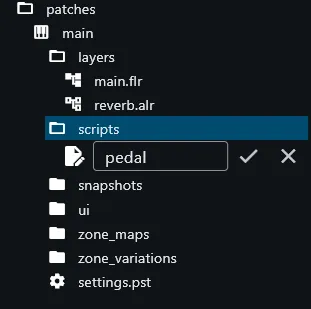
Name it pedal, then double-click it to open.
Try the AI First
Section titled “Try the AI First”As with the zone mapping earlier, this walkthrough turns to the built-in AI before writing anything by hand. Open the AI chat panel the same way as before — the icon button in the top right of the editor window. This time the panel opens empty: pedal scripting is handled by a different AI agent than the one used for sample mapping, with its own, separate conversation.
With pedal.script open, type something like the following into the chat
input and submit it:
create a sustain pedal script for my piano
As before, results can vary. Often the agent understands the request immediately and produces a complete, working script on the first attempt. In other cases it may ask a follow-up question first, or produce a script with a minor flaw that needs a correction round — usually resolved within a reply or two.
The Script, Explained
Section titled “The Script, Explained”For completeness — and as a reference to compare an AI-generated result
against — here is a script that implements the intended behaviour correctly.
Open pedal.script in the editor and paste the following code. IMPORTANT:
make sure to delete everything that’s already in the editor first! Select
everything with ctrl+A / command+A, then paste the code over it:
-- BEGIN_INFO_BLOCKscriptInfo = {    scope = 'event-processor',    parameters = {}}-- END_INFO_BLOCK
local pedalDown = falselocal heldNotes = {}
function onProcessEvents(blockLen, events)    for i, event in ipairs(events) do        if event.type == sys_event_types.controller and event.controller == 64 then            local isDown = event.value >= 64            if isDown and not pedalDown then                pedalDown = true            elseif not isDown and pedalDown then                pedalDown = false                for id, _ in pairs(heldNotes) do                    sys_set_note_length(event.offset, id)                end                heldNotes = {}            end        elseif event.type == sys_event_types.noteOff then            if pedalDown then                sys_set_note_length_to_infinite(event.id)                heldNotes[event.id] = true            end        end    endend
Tracking Pedal State
Section titled “Tracking Pedal State”if event.type == sys_event_types.controller and event.controller == 64 then local isDown = event.value >= 64 if isDown and not pedalDown then pedalDown = true elseif not isDown and pedalDown then ...The sustain pedal is standard MIDI CC 64. By convention, values from 0–63 mean
“up” and 64–127 mean “down” — this script uses that same threshold
(event.value >= 64) to collapse the continuous controller value down to a
simple boolean, pedalDown. Half-pedaling (partial sustain, as a real piano’s
mechanism allows) isn’t modelled here; the pedal is treated as fully up or
fully down.
The and not pedalDown / and pedalDown guards make sure the transition
logic only runs once per actual state change, not on every CC64 message —
some controllers send a continuous stream of values while the pedal is held,
not just a single message at the moment it crosses the threshold.
Extending Notes While the Pedal Is Down
Section titled “Extending Notes While the Pedal Is Down”elseif event.type == sys_event_types.noteOff then if pedalDown then sys_set_note_length_to_infinite(event.id) heldNotes[event.id] = true endendNormally, a note-off event would end the note immediately. Here, if the pedal
happens to be down at that exact moment, the note-off is effectively
intercepted: sys_set_note_length_to_infinite extends the note indefinitely
instead of letting it stop, and its event id is recorded in heldNotes so it
can be found again once the pedal comes back up.
If the pedal is not down when a note-off arrives, this branch does nothing — the event passes through untouched and the note stops normally, exactly as it would without this script in place.
Releasing Held Notes on Pedal-Up
Section titled “Releasing Held Notes on Pedal-Up”elseif not isDown and pedalDown then pedalDown = false for id, _ in pairs(heldNotes) do sys_set_note_length(event.offset, id) end heldNotes = {}endThe moment the pedal transitions back to “up,” every note being held in
heldNotes gets its length fixed with sys_set_note_length(event.offset, id) — using the pedal-up event’s own offset as the note’s actual end point,
so every held note stops in sync, exactly when the pedal lifts. heldNotes is
then cleared, ready for the next pedal press.
Install the Script Processor
Section titled “Install the Script Processor”Switch to the main.flr layer editor. Drag a Script processor from the
processor list and drop it before the source processor — the same position
used for the sequencer script in the 303 walkthrough, so it sees every note
and controller event before the source acts on them.
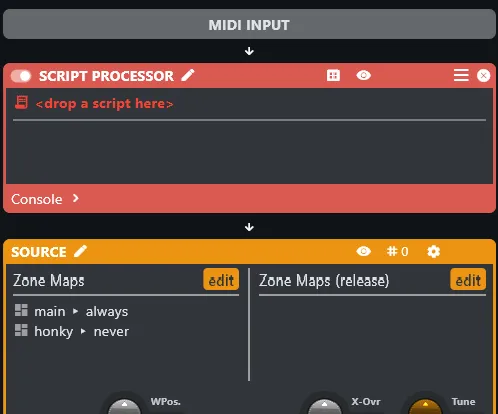
Drag pedal.script from the file tree and drop it into the script processor
where it reads <drop a script here>.
Unfold the script console. It should report successfully compiled.
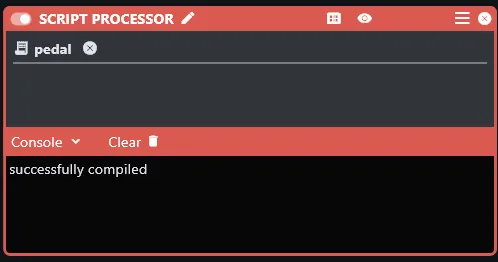
With that in place, the piano can be played with correct sustain-pedal behaviour: holding the pedal down lets notes ring on past key-up, and releasing it cuts every held note at once.
Outline
Section titled “Outline”- End of Pass 1: instrument is playable, sound-designed, and pedal-aware