Introduction
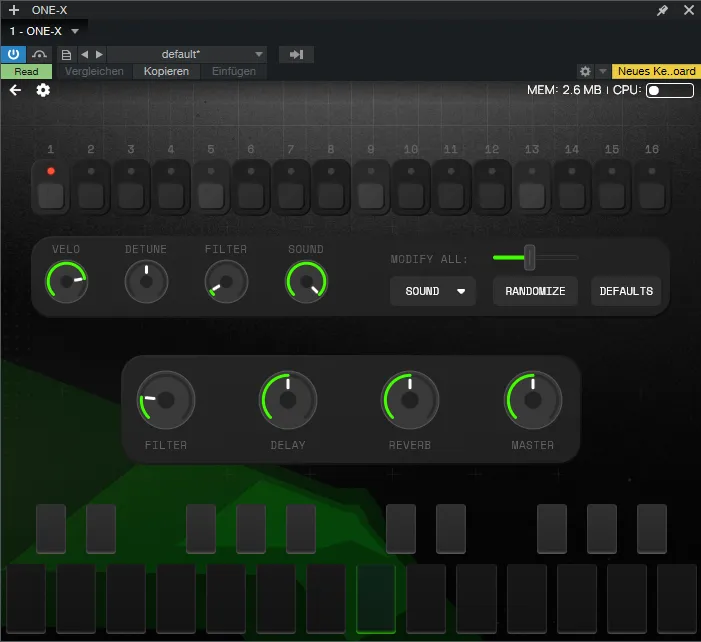
This walkthrough builds a self-contained, 16-step bass sequencer in the style of the classic Roland TB-303. By the end you will have a playable instrument with its own step sequencer, per-step sound shaping, global controls, and a realtime spectrum visualizer drawn directly on the instrument background.
What This Walkthrough Is — and Isn’t
Section titled “What This Walkthrough Is — and Isn’t”This is a showcase project. Its purpose is to touch as many major features of the platform as possible in a single, coherent build — not to produce a commercially competitive instrument. The sound design is deliberately straightforward: a single wavetable voice, a filter with an envelope, three send effects. There is nothing here that demands deep synthesis knowledge.
The complexity comes from two other directions:
The UI. A significant portion of this walkthrough is about building an interactive, data-driven interface from scratch. You will write Lua scripts that drive custom controls, synchronise state across multiple independent forms, and handle the platform’s no-self-notification convention correctly. If you are new to the UI Builder, expect to spend more time here than anywhere else.
The realtime sequencer. Running a step sequencer inside the RT script — the script that executes on the audio thread — is an advanced topic. Timing, per-step modulation, and synchronisation with the playhead all happen in a context where blocking is not an option and latency must be kept to a minimum. Parameters arriving from DAW automation are also delivered on the audio thread, which shapes several architectural decisions made in this walkthrough.
If either of those areas is completely new to you, it is worth reading the RT Scripting primer and the UI Builder primer before starting.
What You Will Build
Section titled “What You Will Build”- A 16-step sequencer with a 2-octave note range per step, with silence supported on any step
- Per-step velocity, detune, filter depth, and wavetable position — all editable while the pattern is running
- Batch randomise and reset across all 16 steps for any parameter
- Global filter, delay send, reverb send, and master volume controls
- Full DAW automation support for the filter via a facade parameter that runs its conversion on the RT thread
- A realtime FFT spectrum visualizer rendered as a polygon behind the UI
How the Walkthrough Is Organised
Section titled “How the Walkthrough Is Organised”The build is structured as three successive passes. Each pass adds a layer of functionality across four chapter types — sound design, global parameters, RT scripting, and UI — before the next pass begins. This means the instrument is always in a runnable state at the end of each pass, even if it is not yet complete.
| Pass | What it adds |
|---|---|
| Pass 1 | Basic playback — zone map, processor chain, sequencer engine, step grid and keyboard UI |
| Pass 2 | Per-step modulation — script modulators, per-step knobs, batch controls |
| Pass 3 | Global controls, automation-safe filter facade, spectrum visualizer |
Build order within each pass matters: sound design first (processors must exist before their UIDs can be copied), then global parameters, then RT scripting, then UI.