RT Scripting: The Sequencer Engine (Pass 1)
The sequencer is implemented as an RT script — a Lua processor that sits in the
event chain and both responds to incoming MIDI (to start and stop playback) and
drives its own timing via onProcessBlock to fire steps at the right moments.
This pass covers the core loop: starting, stopping, stepping through stepData,
and publishing the playhead position to the UI. Per-step modulation (velocity,
detune, filter, wavetable position) is added in Pass 2.
Create the Script
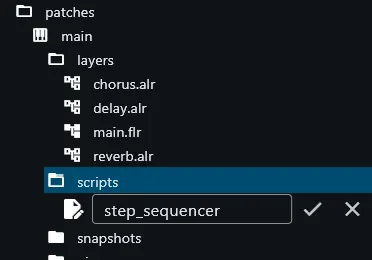
Section titled “Create the Script”Right-click patches -> main -> scripts in the file tree and choose Create
new Script. Name it step_sequencer.
Paste the Script
Section titled “Paste the Script”Open the new script in the editor and paste the following code. IMPORTANT: make sure to delete everything that’s already in the editor first! Select everything in the editor with ctrl+A / command+A, then paste the code over it:
-- Script: "step_sequencer"--
-- BEGIN_INFO_BLOCK
scriptInfo = {  scope = 'event-processor',  parameters = {}}
-- END_INFO_BLOCK
-- list of referenced UIDs (replace with your own from the editor):local mainZoneMapId = "<copy from your editor>"
local stepData
stepData = sys_subscribe_to_parameter("stepData", function(v)  stepData = vend)
-- key within octave: determined by the trigger note:local keyWithinOctave
-- time until the next step is due:local timeUntilNextStep
-- currently played step (playhead). NOTE: 1-based indices throughout;-- stepIdx == 0 (or < 1) means "not playing":local stepIdx = 0
function onProcessEvents(blockLen, events)  for i, event in ipairs(events) do    if event.type == sys_event_types.noteOn then
      -- start playback at step 1, at the block offset of the incoming note:      timeUntilNextStep = event.offset      stepIdx = 1      keyWithinOctave = event.note % 12    end
    if event.type == sys_event_types.noteOff then      stepIdx = 0
      -- notify the UI that playback has stopped:      sys_set_parameter_value("stepPlaying", stepIdx)    end  endend
function startNote(curStep, offset, length)
  -- muted steps have a note value of -1:  if curStep.note < 0 then return end
  local eventId = sys_create_note_event(    offset,    0,    curStep.note + keyWithinOctave,    100,    length)
  sys_force_note_event_to_zone_map(eventId, mainZoneMapId)end
function onProcessBlock(blockLen)  -- nothing to do if we're not playing:  if stepIdx < 1 then return end
  -- is there a new step ready to play within the current block?  if timeUntilNextStep < blockLen then
    -- publish the currently playing step (play-head) for the UI to display:    sys_set_parameter_value("stepPlaying", stepIdx)
    local lengthOneSixteenth = sys_get_quarter_note_length() / 4
    local curStep = stepData[stepIdx]
    -- play a note at the calculated offset and a length of 1 eighth note (2 × 16th):    startNote(curStep, timeUntilNextStep, lengthOneSixteenth * 2)
    -- calculate the remaining time until the next step is due:    timeUntilNextStep = timeUntilNextStep + lengthOneSixteenth
    -- advance the step index; wrap back to 1 after step 16:    stepIdx = stepIdx + 1
    if stepIdx > 16 then      stepIdx = 1    end  end
  -- after the block is finished, decrease the time until next step by the block duration:  timeUntilNextStep = timeUntilNextStep - blockLenend
Disable Direct Key Triggering
Section titled “Disable Direct Key Triggering”By default, any incoming noteOn event triggers the zone map directly. Because the sequencer intercepts noteOn events to start its own playback, those raw key events must not also trigger notes — otherwise every keypress would play a note on top of the sequencer output.
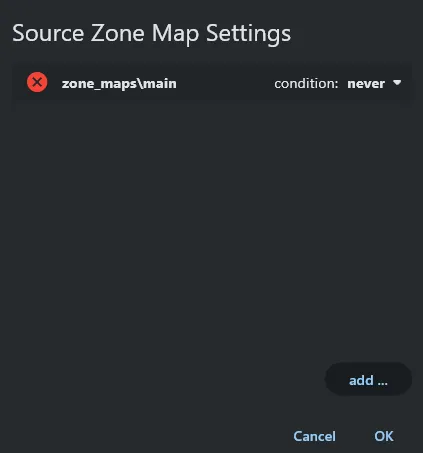
Open the layer editor for main.flr. In the source processor, click Edit in
the left (note-on) column and set main.zmap’s condition to Never. The zone
map is now silent to direct key input; only the script can route notes into it.
Copy the Zone Map UID and Update the Script
Section titled “Copy the Zone Map UID and Update the Script”The script routes every sequencer note into main.zmap via
sys_force_note_event_to_zone_map, which requires the zone map’s UID. Open
main.zmap in the zone map editor and copy its UID.

In the script, find the UID section just below -- END_INFO_BLOCK and replace
the placeholder string with the UID you just copied:
local mainZoneMapId = "1b1d60a5-8e90-46a4-a042-a90a745c62ab"Note: the UID above is an example only — do not paste it verbatim. Each project generates its own unique IDs; always use the one you copied from your own zone map editor.
As the script grows in later passes, additional UIDs will be added to this section in the same way, keeping all external references in one place at the top of the file.
UIDs and named parameters. When right-clicking a parameter — a knob, fader, or similar value — the context menu offers two options: Copy Parameter UID and Assign name. You can assign a human-readable name and use that string everywhere a UID is expected. For zone maps and built-in modulation targets (such as the detune target used in Pass 2), naming is not supported and the menu only shows Copy Parameter UID. Processor nodes (script modulators, the master Amp used by the visualizer, etc.) do not show either naming option at all — their UID is always obtained by copying.
Named parameters are convenient but carry one risk: the names are arbitrary strings you define, and two parameters sharing the same name will collide, producing undefined behaviour. A simple naming scheme prevents this — the examples in this walkthrough use
"processor/parameter"(e.g."filter/cutoff","send_levels/delay"). The zone map UID above is copied the traditional way because zone maps do not support naming; later passes will show both approaches.
Install the Script Processor
Section titled “Install the Script Processor”Switch back to the main.flr layer editor. Drag a Script processor from the
processor list and drop it before the source processor — it must sit first
in the chain so it intercepts noteOn and noteOff events before the source sees
them.
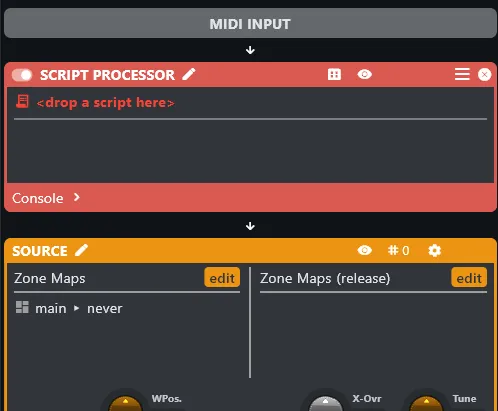
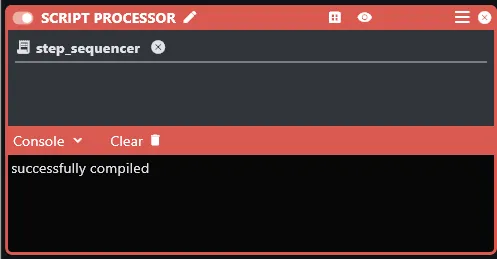
Drag step_sequencer.script from the file tree and drop it into the script
processor where it reads <drop a script here>.
Unfold the script console. It should report successfully compiled.
With that, the sequencer is live. Press any key on the keyboard and the script
will start cycling through the 16 steps, playing notes from main.zmap at the
current host tempo.
How the Script Works
Section titled “How the Script Works”Subscribing to Step Data
Section titled “Subscribing to Step Data”stepData = sys_subscribe_to_parameter("stepData", function(v) stepData = vend)At load time, the script subscribes to the stepData global parameter and
stores the current value in a local variable. The callback keeps that local in
sync whenever the UI edits a step — the RT script always has the latest data
without polling.
Starting and Stopping
Section titled “Starting and Stopping”if event.type == sys_event_types.noteOn then timeUntilNextStep = event.offset stepIdx = 1 keyWithinOctave = event.note % 12end
if event.type == sys_event_types.noteOff then stepIdx = 0 sys_set_parameter_value("stepPlaying", stepIdx)endA noteOn starts the sequencer from step 1 (1-based throughout). The first step
fires at event.offset — the exact moment the key was pressed — so there is no
quantisation delay on the attack.
stepIdx == 0 is the “stopped” sentinel. Setting it on noteOff and immediately
writing it to stepPlaying lets the UI clear its playhead the instant a key is
released, rather than waiting for the next block.
keyWithinOctave captures the pitch class of the trigger key (note % 12),
stripping the octave information. This value is added to each step’s stored note
at playback time, so the sequence transposes to match whatever key the player
holds — F transposes the sequence to F, regardless of octave.
The Step Clock
Section titled “The Step Clock”local lengthOneSixteenth = sys_get_quarter_note_length() / 4sys_get_quarter_note_length() returns one quarter note in seconds at the
current host tempo. Dividing by 4 gives a sixteenth note, and the value stays in
sync with the host automatically.
timeUntilNextStep is a running countdown. Each block, the script checks
whether the next step falls within the current block
(timeUntilNextStep < blockLen), fires it if so, then subtracts blockLen at
the end regardless — keeping the countdown accurate across blocks of any size.
Playing a Step
Section titled “Playing a Step”local curStep = stepData[stepIdx]startNote(curStep, timeUntilNextStep, lengthOneSixteenth * 2)stepData and stepIdx are both 1-based, so indexing is direct. startNote
skips steps whose note is -1 (silence) and adds keyWithinOctave to the
stored note for transposition. In this pass, all notes play at a fixed velocity
of 100. Per-step velocity, detune, filter, and wavetable position are added in
Pass 2.
Publishing the Playhead
Section titled “Publishing the Playhead”sys_set_parameter_value("stepPlaying", stepIdx)Written on every step so the UI can move its playhead indicator in real time.
Also written to 0 on noteOff so the UI knows playback has stopped.
Outline
Section titled “Outline”- Per-step modulation: velocity, detune, filter, wavetable position (Pass 2)