Parameter Bindings
Bindings are the declarative, no-code way to connect controls to parameters. They are the preferred approach for the vast majority of UI behaviour — reach for Lua scripting only when a binding genuinely cannot express what you need.
What Is a Binding?
Section titled “What Is a Binding?”A binding is a live, two-way link between a control and a parameter value:
- When the user interacts with the control, the parameter updates.
- When the parameter changes (from the engine or from another control), the control updates.
No event handlers, no callbacks, no manual sync.
Binding via parameterUid
Section titled “Binding via parameterUid”Binding is done by setting parameterUid under a control’s props:. Despite
the field name, it accepts either a UUID or a parameter name:
# Engine parameter — always use the UUID (no user-visible name exists)cutoff_knob:  type: knob  pos: { x: 100, y: 50, w: 48, h: 48 }  props:    parameterUid: "08afbf03-738b-48ad-a340-0c482f505683"
# User-defined global parameter — name is clearer and works just as welltab_panel:  type: portal  anchors: { left: 0, right: 0, top: 32, bottom: 0 }  props:    parameterUid: tab-index    forms: [...]
Engine parameters have a UUID but no user-visible name — reference them by UUID only. User-defined global parameters have both a name (you choose it in the patch settings) and an auto-assigned UUID — either works, but the name is usually more readable in YAML.
Parameter Sources
Section titled “Parameter Sources”Engine Parameters
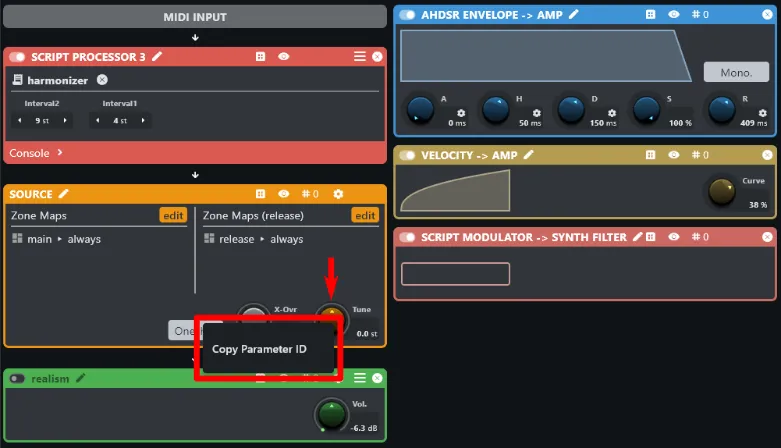
Section titled “Engine Parameters”Engine parameters are defined by the audio modules in your instrument. To get a parameter’s UUID:
- Open the Layer editor.
- Right-click the parameter you want to bind.
- Choose Copy Parameter UID.
- Paste into
parameterUidin your YAML.
User-Defined Global Parameters
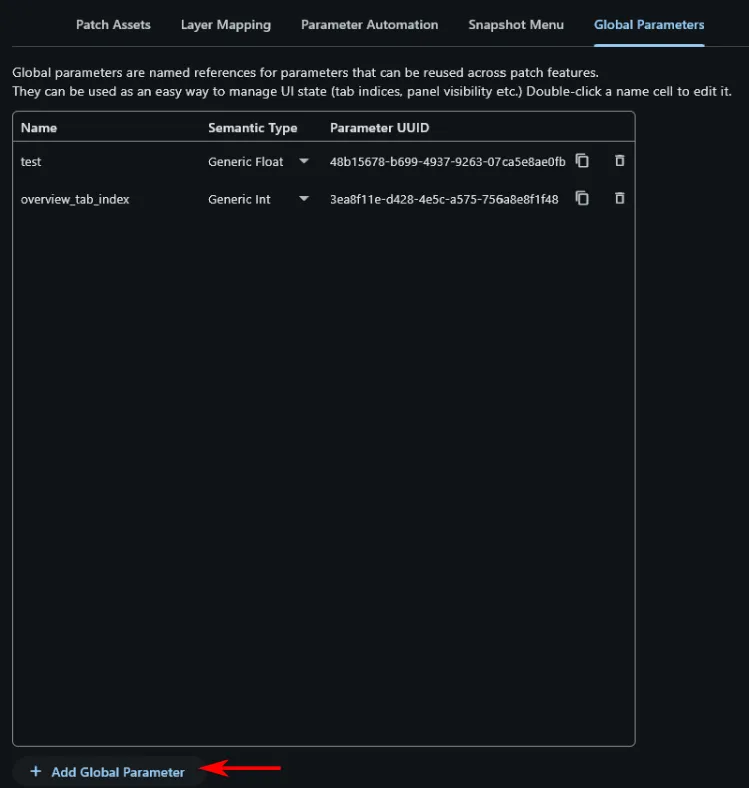
Section titled “User-Defined Global Parameters”You can create parameters that have no audio meaning — they exist purely as shared UI state. Global parameters are managed in the Patch Settings view. Add a new one and configure:
| Field | Description |
|---|---|
name | Your chosen identifier, e.g. tab-index. This is the string you use in YAML and Lua. |
samentic type | generic float, generic int, generic bool, or generic string |
The editor assigns a UUID automatically. The UUID is shown in the global parameter table in Patch Settings and can be copied from there. In practice you’ll use the name — it’s more readable and just as reliable.
Global parameters are the right tool for UI state: tab index, selected mode, expanded panels.
Binding the Same Parameter to Multiple Controls
Section titled “Binding the Same Parameter to Multiple Controls”A single parameterUid can appear in as many controls as you like. This is the
key pattern for synchronized UI elements.
Example: tab buttons + content panel in sync
- In Patch Settings, create a global parameter named
tab-index(int, min 0, max 2, default 0). - A single
buttonSelectorhandles all the tab buttons:
tabs: type: buttonSelector pos: { x: 0, y: 0, w: 320, h: 32 } props: parameterUid: tab-index labels: [Osc, Filter, Env] orientation: horizontal- A
portalswitches the content area using the same parameter:
content: type: portal anchors: { left: 0, right: 0, top: 32, bottom: 0 } props: parameterUid: tab-index forms: - form: osc_tab - form: filter_tab - form: env_tabThe buttons and the panel are now permanently in sync. No Lua needed.
When Bindings Are Not Enough
Section titled “When Bindings Are Not Enough”Bindings handle:
- Value-to-control sync in both directions
- Multi-control sync via a shared
parameterUid - Tab / conditional panel switching
- Switching between sub-forms based on a parameter value (via
portal)
Bindings do not handle:
- Computed values (e.g. display the sum of two parameters)
- Conditional logic beyond what
portal’s index-based switching covers - Side effects on other parts of the instrument
For those cases, use a Lua backing script.